

DBC Network
Showing posts with label Broadband. Show all posts
Showing posts with label Broadband. Show all posts
Sunday, 31 October 2010
Deltenna's WiBE rural broadband device: swans and geese now free to browse

Tuesday, 14 September 2010
The US' Fastest Internet Speed Is Coming to Chattanooga, Tennessee

If you've ever heard of Chattanooga in Tennessee, chances are you're either a resident or you remember this remarkable UFO house constructed in the '70s. From today, it'll be known for offering the fastest internet connection in the US—1Gbps.
Of course, the 1Gbps speed from EPB won't be a patch on the 40Gbps that this Swedish granny was drying her laundry on two years ago, but 1Gbps is actually 200 times faster than the average speed the rest of the US receives.
Any Chattanooga citizens dreaming of lightning-fast downloads will have to fork out $350 a month, though the CEO of EPB admitted that they "don't know how to price a gig...we're experimenting. We'll learn."
In a quote reminiscent of George Mallory's infamous answer to the question of why he chose to climb Mt Everest, the EPB CEO Harold DePriest told the NY Times the reason they're launching a 1Gbps service is "because we can."
Non-Chattanoogaians after similarly-fast speeds will have to look to Google to provide the answer. Bad luck if you weren't one of the 500,000 lucky individuals chosen for their fiber network experiment. [NY Times]
Tuesday, 31 August 2010
Clearwire Rover: Pay As You Go WiMax By the Day, Week, or Month

Clearwire just launched Rover, a no-contract service that offers unlimited WiMax goodness for $5 a day, $20 a week, or $50 a month, along with two new WiMax modems. Yep, get ready to start topping up your 4G.
The service is launching in all of Clearwire's WiMax markets with two modems: a $99 USB stick called, um, the Rover Stick, and a $150 puck called, uh, the Rover Puck. The latter of the two can service as a WiMax hotspot for up to eight devices—it has Wi-Fi b/g/n and can simultaneously run 2 SSIDs—though neither have any 3G connectivity.

Here, for your reference, is a map of Clearwire's coverage.
Users will be able to buy new service in some retail stores, like Best Buy, or online, in $20 and $50 increments. Rover, they explain, is "designed for digitally addicted youth who refuse to settle for long-term contracts." Don't you call me an addict, Clearwire. [Rover via Slashgear]
Clearwire Introduces Rover: Instant Gratification to the Internet Addicted
Nation's First Pay-As-You-Go 4G Mobile Broadband Service
Unlimited Usage for Just $5/day, $20/week, $50/month
Redefines "Friends with Benefits" with Rover Puck(TM)
Rover Stick(TM) Available for Those With Commitment Issues
KIRKLAND, Wash., Aug 30, 2010 (BUSINESS WIRE) –
Clearwire Corporation (NASDAQ:CLWR) today unveiled Rover(TM): the nation's first pay-as-you-go 4G mobile broadband service for tech-savvy Gen Y customers. The Rover brand is designed for digitally addicted youth who refuse to settle for long-term contracts, overpriced internet service, or speeds slower than what they've become accustomed to at home.
Rover is available in all of Clearwire's 49 4G markets across the U.S. at rover.com. Rover is also available at CLEAR stores, Best Buy stores and select independent wireless dealers in Houston and St. Louis.
"Simple, commitment-free wireless services are wildly popular with the Gen Y crowd, and Rover provides them with the first pay-as-you-go unlimited mobile internet offering at 4G speeds," said Mike Sievert, chief commercial officer for Clearwire. "We've built Rover from the ground up with products, pricing and features designed specifically to serve a younger market who knows how you get connected is just as important as where. Expanding our offers to meet this underserved segment is an important new business opportunity for Clearwire as we continue to extend our leadership in mobile broadband."
"The opportunity for pay-as-you-go mobile broadband should not be underestimated," said Carrie MacGillvray, program manager and wireless analyst at IDC. "Prepaid – or pay-as-you-go – data provides an option for consumers to experiment with the power of mobile broadband without being saddled with a two-year commitment. A prepaid mobile broadband service can offer consumers the ability to access and share Internet service, at home or on the go, in an affordable way."
PUCKS AND STICKS
Friends with Benefits
Rover's flagship device is the Rover Puck: an ergonomically designed portable Wi-Fi hotspot that lets you share broadband access, or "Puck", with up to eight devices at home, out on the town or nearly anywhere the feeling strikes you. The Rover Puck can easily slip into a purse or backpack and serve as an on-the-go broadband access point for devices such as laptops, netbooks, the iPad(TM), the iPod touch(R), smartphones, PSP(R) systems, game consoles, and Wi-Fi enabled digital cameras, among others. Users have the option to connect up to eight Wi-Fi enabled devices simultaneously.
The Rover Puck features mobile download speeds of three to six mbps, with bursts over 10 mbps (up to 4x faster than conventional 3G), using Clearwire's 4G network. The Rover Puck is available today for $149.99 (plus tax).
Going Solo
The Rover Stick(TM) is a personal 4G USB modem that connects any notebook, laptop or desktop to the Rover 4G Service. The Rover Stick is compatible with MacBook(R) and MacBook(R) Pro laptops using Mac OS X, as well as netbooks and notebooks running Windows(R) XP, Windows Vista(R) and Windows(R) 7. Offering the same super-fast internet speed as the Rover Puck, the Rover Stick is available today for $99.99 (plus tax).
No Commitment Issues
New users receive two free days of service to ensure Rover's metro-focused 4G coverage fits their mobile lifestyle. Rover has a 14-day no-hassle return policy for any device purchases made on rover.com or in CLEAR stores.
Rover is priced at $5/day, $20/week, or $50/month for unlimited 4G internet usage. Depending on the retail channel, customers will be able to purchase a Rover Re-Up PIN code or physical Rover Re-Up card in $20 or $50 denominations. Rover Re-Up is available online at rover.com, at all retail outlets carrying the Rover Puck or Rover Stick, as well as at Rover Re-Up specific retail locations. Rover does not require a credit card to activate service and is designed to bring broadband internet to a new audience.
GENERATION Y
The Rover brand is designed for a demographic that has grown up in a wireless world. They manage their life through the internet, and their devices signify status. Rover provides products and service to meet their need for all things internet.
"Rover's target audience has never known life without internet. They love their devices and they want as much speed and capacity as possible, without the limits and commitments of most mobile options," said Seth Cummings, GM, Rover. "Rover offers iconic devices along with straight-forward pricing, and plans where unlimited truly means unlimited. It is not in Rover's DNA to be constraining, confusing or complex."
MARKETING CAMPAIGN
Launch campaign
Rover's initial communications will showcase the dramatic ways in which 4G mobile broadband can change human behavior in previously unimagined ways. More information is available at www.evology.com.
Life @ 4G
Rover.com invites users to experience "Life @ 4G." Rover-sponsored athletes and music artists will be profiled, showing how Rover influences their careers and lives as they live Life @ 4G. Sporting a Rover wingsuit, base jumper JT Holmes, who travels up to 150 mph during freefall proximity flying, lives life with the Rover Puck and no strings attached.
Rover Activity Badges
Rover believes in loyalty, and will introduce a badging system that rewards users for participating in Rover activities. For example, the "Trendsetter" badge recognizes early adopters of Rover in each market, and the "Friends with Benefits" badge acknowledges users who refer friends to the Rover service. Badges have become wildly popular on location-based apps and are expected to resonate with the youth consumer and motivate usage.
THE BIG PICTURE
4G Network of Networks
Rover is the newest brand connected to the Clearwire 4G network, joining brands which include CLEAR(R), Sprint 4G, Comcast High-Speed 2Go, Time Warner Cable Roadrunner 4G, Best Buy Connect and Cbeyond. Today, the Clearwire 4G "network of networks" is available in select cities throughout the United States, where approximately 56 million people live.
Detailed coverage maps of service availability can be found at www.rover.com/coverage.
For press, broadcast and bloggers: Video footage can be linked from www.youtube.com/rover4g. Product and brand images and company logos can be downloaded from the Clearwire Newsroom at www.clearwire.com/newsroom. To subscribe to Rover RSS news feed, click here.
For more information about Rover, visit www.rover.com. Clearwire company information is available at http://www.clearwire.com.
Wednesday, 23 June 2010
Deltenna Claim WiBE Gadget Delivers Stable 2Mbps Broadband to UK Rural Areas Claim WiBE Gadget Delivers Stable 2Mbps Broadband to UK Rural Areas
Deltenna, a UK start-up that designs and manufactures wireless networking infrastructure and access points, has launched a small (18cm x 13cm) new self-install Wireless Broadband Enabler (WiBE) gadget that uses the 3G Mobile Broadband network to create a 2Mbps internet Hotspot. The key advantage of WiBE is that it can still work even where a 3G mobile phone can't register a signal.
The WiBE device works by automatically identifying the mobile cell with the fastest available download speed and configures its aerials to achieve the best possible connection. Deltenna claims that it can even deliver a data throughput 30-times greater than a 3G USB modem (dongle) in areas of weak signal.

The maximum throughput for WiBE is 7.2Mbps and "extensive rural usage tests in the UK" have allegedly demonstrated an average download speed of 2.8Mbps. A future 4G (LTE) device is also in development for 2011 and could achieve typical rural broadband speeds of 50Mbps and above. However it is highly unlikely that any mobile operator would actually be able to support that speed in real-world conditions, at least not for quite a few years.
WiBE is Plug and Play (PnP): users plug in the device, place it on a windowsill and connect their laptops, smartphones and VoIP phones from anywhere in the home or office via Wi-Fi. In that respect it is similar to the MiFi devices from Three (3) , although they lack WiBE's many signal boosting advantages.
The connection range is apparently up to five-times that of a 3G Mobile Broadband USB Modem (dongle). Pretty good for rural residents and it could even have applications in other areas. It will also take a standard SIM card from your operator. What Deltenna wouldn't say is how much it costs.
The WiBE device works by automatically identifying the mobile cell with the fastest available download speed and configures its aerials to achieve the best possible connection. Deltenna claims that it can even deliver a data throughput 30-times greater than a 3G USB modem (dongle) in areas of weak signal.
The maximum throughput for WiBE is 7.2Mbps and "extensive rural usage tests in the UK" have allegedly demonstrated an average download speed of 2.8Mbps. A future 4G (LTE) device is also in development for 2011 and could achieve typical rural broadband speeds of 50Mbps and above. However it is highly unlikely that any mobile operator would actually be able to support that speed in real-world conditions, at least not for quite a few years.
Andrew Fox, CEO of Deltenna, said:
"There are still millions of people throughout Europe and the US for whom fast broadband is a myth. The WiBE's range and throughput means broadband can more easily, and cost effectively, be deployed in regions that don't have access to DSL."
"There are still millions of people throughout Europe and the US for whom fast broadband is a myth. The WiBE's range and throughput means broadband can more easily, and cost effectively, be deployed in regions that don't have access to DSL."
WiBE is Plug and Play (PnP): users plug in the device, place it on a windowsill and connect their laptops, smartphones and VoIP phones from anywhere in the home or office via Wi-Fi. In that respect it is similar to the MiFi devices from Three (3) , although they lack WiBE's many signal boosting advantages.
The connection range is apparently up to five-times that of a 3G Mobile Broadband USB Modem (dongle). Pretty good for rural residents and it could even have applications in other areas. It will also take a standard SIM card from your operator. What Deltenna wouldn't say is how much it costs.
Thursday, 17 June 2010
iCON USB modem adds wireless broadband to Pioneer’s new car navigation system
LEUVEN, Belgium - Option (Euronext: OPTI; OTC: OPNVY), the wireless technology company, today announced that Pioneer Corporation has selected Option as its trusted partner for a second wireless project in the Japanese market. Option’s new iCON® wireless USB modem will add broadband connectivity to Pioneer latest car navigation systems. An iCON USB modem, a SIM card and a data plan from SoftBank Mobile network are provided with each new car navigation system. The wireless car navigation solution will become available as of July and will be sold in retail shops across Japan.
The addition of the wireless solution based on the iCON USB modem gives the users of the car navigation systems (AVIC-T07, AVIC-T05 and AVIC-T05-S) access to real-time information available from Pioneer services including information on traffic congestion, nearby gas stations and fuel prices along the route, parking information, weather forecast for the selected destination, notification of parking space availability ( sent five minutes before arrival), pick-up assist and location based event information provided by Yahoo! Japan.
This project demonstrates Option’s ability to offer, through its expertise in connectivity software and integration support, customized solutions and professional services to the OEM/ODM market, resulting in certification acceptance from SoftBank. Building on the successful experience with the first wireless car navigation system mid 2008, this is the second project where Pioneer and SoftBank decided to work with Option on the new generation of wireless car navigation systems.
Based in Japan, Pioneer Corporation is a leading global manufacturer of consumer- and business-use electronics products such as audio, video and car electronics. The Mobile Entertainment Business group is working to expand the frontiers of in-car entertainment by fusing audiovisual entertainment and car navigation systems using the latest technological innovations.
Option’s new slim iCON USB modem fits perfectly into Pioneer’s new car navigation system. The small, lightweight HSPA USB device is specifically developed and aimed at the automotive and navigation systems sector.
ABOUT OPTION
Option, the wireless technology company, is a leading innovator in the design, development and manufacture of 3G HSUPA, HSDPA, UMTS, EDGE, and WLAN technology products for wireless connectivity solutions. Option has established an impressive reputation for creating exciting products that enhance the performance and functionality of wireless communications. Option is headquartered in Leuven, Belgium. The company also has Research & Development in Belgium (Leuven), Germany (Düsseldorf and Augsburg) and an ISO 9001 production engineering and logistics facility in Ireland (Cork). Option maintains offices in Europe, US, Greater China, Japan and Australia. For more information please visit our brand new website www.option.com.
The addition of the wireless solution based on the iCON USB modem gives the users of the car navigation systems (AVIC-T07, AVIC-T05 and AVIC-T05-S) access to real-time information available from Pioneer services including information on traffic congestion, nearby gas stations and fuel prices along the route, parking information, weather forecast for the selected destination, notification of parking space availability ( sent five minutes before arrival), pick-up assist and location based event information provided by Yahoo! Japan.
This project demonstrates Option’s ability to offer, through its expertise in connectivity software and integration support, customized solutions and professional services to the OEM/ODM market, resulting in certification acceptance from SoftBank. Building on the successful experience with the first wireless car navigation system mid 2008, this is the second project where Pioneer and SoftBank decided to work with Option on the new generation of wireless car navigation systems.
Based in Japan, Pioneer Corporation is a leading global manufacturer of consumer- and business-use electronics products such as audio, video and car electronics. The Mobile Entertainment Business group is working to expand the frontiers of in-car entertainment by fusing audiovisual entertainment and car navigation systems using the latest technological innovations.
Option’s new slim iCON USB modem fits perfectly into Pioneer’s new car navigation system. The small, lightweight HSPA USB device is specifically developed and aimed at the automotive and navigation systems sector.
ABOUT OPTION
Option, the wireless technology company, is a leading innovator in the design, development and manufacture of 3G HSUPA, HSDPA, UMTS, EDGE, and WLAN technology products for wireless connectivity solutions. Option has established an impressive reputation for creating exciting products that enhance the performance and functionality of wireless communications. Option is headquartered in Leuven, Belgium. The company also has Research & Development in Belgium (Leuven), Germany (Düsseldorf and Augsburg) and an ISO 9001 production engineering and logistics facility in Ireland (Cork). Option maintains offices in Europe, US, Greater China, Japan and Australia. For more information please visit our brand new website www.option.com.
Sunday, 6 June 2010
Motorola SURFboard SB5120 - Cable modem - external - Hi-Speed USB / Fast Ethernet - 38 Mbps

Product Description
Motorola's next-generation SURFboard SB5120 Cable Modem incorporates the latest DOCSIS 2.0 Advanced Time Division Multiple Access (A-TDMA) and Sychnronous Code Division Multiple Access (S-CDMA) technologies to provide up to three times greater upstream capacity than DOCSIS 1.0/1.1 systems. Packed with power, the SB5120 is interoperable and backward compatible with DOCSIS 1.0 and 1.1 for a fast and timely transition - operators can deploy the SB5120 today without a service interruption.The Motorola SURFboard SB5120 is flexible and allows operators to maximize their current infrastructure investments and also offer additional cost-effective services, all at the same time. Convenient for both operators and end-users alike, the SURFboard SB5120 ensures end-user security via a top-mounted stand-by switch that quickly isolates the USB and Ethernet connection to the PC without disconnecting the cable modem from the RF network. What's more, the SB5120 simplifies troubleshooting with its front panel status indicator LEDs and integrated HTML diagnostics page. The SURFboard SB5120 is competitively priced and includes many of the valuable features found in previous SURFboard models, such as USB and Ethernet connectivity, software upgrades available over the network, proven field reliability, a quality, advanced RF design, and a high-performance processor.Highly functional and attractive, the Motorola SURFboard SB5120 features a new, compact design that is a stylish and clutter-free addition to virtually any desktop.
Details
- Latest DOCSIS 2.0 Advanced Time Division Multiple Access (A-TDMA) and Sychnronous Code Division Multiple Access (S-CDMA) technologies
- Compatible with DOCSIS 1.0 and 1.1 for a fast and timely transition
- Convenient for both operators and end-users alike
Wednesday, 26 May 2010
Comcast to offer Extreme 105Mbps broadband package starting in June?


 DSLReports
Saturday, 8 May 2010
The FCC's New Plan for Broadband (and Why Nobody's Happy About It)

The FCC was told fairly bluntly it doesn't have the power to mandate net neutrality. So! Time for a new plan.
The problem, as FCC Chairman Genachowski sees it, is that the FCC can keep trying to regulate stuff using indirect authority (which sucks because it doesn't go far enough, as the chairman sees it), or they could reclassify internet communications, so that the FCC has direct authority, but that would mean ISPs would have crazy new regulatory requirements (which sucks because it goes too far down the regulatory road).
Hence, the third way, which tries to neatly slip between the two extremes by breaking broadband up into different components, subject to different regulations, giving the FCC what the chairman says is "modest authority" over broadband, shoring up the shaky legal ground its internet powers sit on following the Comcast decision:
• Recognize the transmission component of broadband access service-and only this component-as a telecommunications service;
• Apply only a handful of provisions of Title II (Sections 201, 202, 208, 222, 254, and 255) that, prior to the Comcast decision, were widely believed to be within the Commission's purview for broadband;
• Simultaneously renounce-that is, forbear from-application of the many sections of the Communications Act that are unnecessary and inappropriate for broadband access service; and
• Put in place up-front forbearance and meaningful boundaries to guard against regulatory overreach.
The main point being that under this plan, "the transmission component" of broadband falls under the FCC's direct authority—not any of the actual content on the internet, or how much it costs—which the FCC says wouldn't change much for ISPs, since it's narrowly targeted (it "would not give the FCC greater authority than the Commission was understood to have pre-Comcast"), but at the same time, it would let the FCC move forward on the things it needs to do, like work on the national broadband plan. The upshot is that while broadband wouldn't be regulated as tightly as say, telephone service, the FCC is interested in applying a limited form of net neutrality, limiting the ability of ISPs to discriminate against particular services or applications or websites.
Broadband providers hate it, as the NYT and WSJ show, because they think it goes too far, with Verizon saying it's "legally unsupported," and Republicans apparently passing around proposed legislation from a year ago that would ban the FCC from regulating the internet. And so do the hardcore pro-net neutrality groups, thinking the FCC isn't grabbing the authority it really needs, like Public Knowedge. Well, you know, you can't make everybody happy.
Though re-watching this clip of Al Franken reaming Comcast's CEO is still pretty entertaining. [NYT, WSJ, Broadband.gov]
Saturday, 20 March 2010
Clear WiMAX USB modem impressions


Unlike most 3G options, Clear's WiMAX solution can actually replace your home ISP. We'd probably recommend an at-home modem over a USB stick if you're going that route, but we suppose one could always shove their USB modem in their home desktop before hitting the web for the day. Our focus here is on the mobile side, but suffice it to say, if your home is within a well-covered patch of 4G, there's no reason you shouldn't considering ditching your existing ISP and giving this a shot. Granted, we wouldn't recommend that heavy users (particularly those who spend days on end uploading wacky YouTube HD videos) do such a thing, but for casual browsers the speed is likely to satisfy -- and it'll probably save you a buck or two in the end over what you're paying now.

The actual Motorola USB modem that we used was a 4G-only device, which makes it extremely limited when you're traveling. For example, if using a traditional 3G USB modem whilst in the backseat of a vehicle, it can automatically step down to 2G when you pass out of the city and into a more rural setting. It's typically seamless, and it enables one's internet experience to remain in tact even when jumping from one network to another. Unfortunately, this 4G stick is useless when traveling outside of a 4G coverage area; frankly, we'd recommend one of the 4G / 3G sticks if you're jonesing for something quicker, which will allow you to still surf at 3G speeds if you travel to an area that's outside of the 4G umbrella.
That said, the modem itself performed well in the 4G cities that we surveyed. Installation was a breeze on both Mac and PC platforms, and the bundled USB adapter enabled us to angle it as we pleased and prevented the stick itself from blocking our power ports when inserted. The connection management software was rather barebones, and it simply auto-searches and auto-connects to a network (at least on the Mac side) whenever it detects that a 4G device is present. Once connected, a row of lights informs you of your signal strength. And that's where things begin to get iffy.

More so than any 3G area we've ever been in, 4G connections just seemed overly finicky. We could literally move two feet from our current position and drop the entire signal, yet be downloading at blazing fast rates after we moved back and reconnected. We also found that the fringe areas of the posted 4G blankets are more "fringy" than those in the 3G world; unless you're in the heart of the city that Clearwire covers, you should probably expect spotty or intermittent coverage. As an example, the entire Engadget staff had full coverage (and great throughput speeds) while using 4G at our CES trailer; just a five minute walk away to the hotel brought about varied results.
I personally couldn't connect to Clearwire's network at all from my 18th floor room, while my Sprint 3G card hummed along fine; my good buddy and confidant Chris Ziegler had no issues hopping on the 4G waves from his 18th floor room that sat just a few meters down from mine. It seemed that our hotel luck was all over the place, with some connecting sans issue, some not at all and some with paltry rates and a signal that tended to drop with some level of frequency. We fully understand that CES was going on, but it's not like everyone has shifted to 4G handsets just yet -- in fact, we'd wager that the 4G network in Vegas was the lightest used during the show. We also had varying levels of success in hotel suites where press conferences were being held. Some of the team was able to liveblog entire pressers on 4G without a hiccup, while others just down the road couldn't find a signal at all to connect to (meaning we had to resort to 3G).

When we were able to nail down a solid connection, speeds were admirable. Not mind-blowing, but definitely a step up from the 3G rates that we've grown accustomed to seeing. On average, we were able to pull between 2,000 and 3,000Kbps down, while upload rates rarely topped 600Kbps. That's a fair bit less than those theoretical maximums (around half, actually), but since when has any internet service actually delivered those lofty peaks? We should also note that latency was far better on 4G than on 3G; we rarely saw ping times over 100ms, while our 3G test from a year ago rarely saw ping times under 150ms.

If you'll compare these rates to those found in the aforementioned 3G test, you'll notice that 4G is a lot more like 3.5G, so to speak. It's not going to smoke your HSDPA connection by any wide margin, and it's a lot more likely to drop out on you in our experience. Of course, one must remember than this technology is still in its infancy, and there are still waves upon waves of rollouts that need to happen before the level of infrastructure supporting it comes close to matching that already installed by 3G operators. Still, if you're looking to buy into 4G today, we can't recommend any solution that doesn't also offer 3G compatibility as a backup. In our testing, we found 4G networks to be far too spotty and unreliable to use as your sole mobile broadband solution. Even if your home or place of work is supposedly blanketed according to Clearwire, there's a decent chance that some rooms, corners and hallways won't be. 'Course, we'd be a lot more willing to forgive the shortfalls if WiMAX were available in more than a handful of cities, but hey, expansion takes time and money -- neither of which are particularly easy to come by these days.
Sunday, 14 March 2010
Take the Consumer Broadband Test, Help the FCC Keep ISPs In Check

Feel like your broadband's not living up to how it's advertised? Here's your chance to prove it: the FCC's introduced a Consumer Broadband Test that'll let you know exactly how good a connection you've got.
The test is in beta, but can be used for both fixed and mobile broadband, and there are already iPhone and Android apps available for download. You can already figure out your broadband speed with YouTube, but the info the FCC collects will be used by the agency to determine the state of broadband in the US. Hopefully it'll also be ammo to help reconcile the difference between hyperspeed ISP claims and your pokey broadband reality. [Broadband Task Force via Boing Boing]
Tuesday, 9 March 2010
The FCC Wants to Turn Part of the Wireless Spectrum Into Free Internet Service

Call me a cynic, but I'm not sure this is ever going to happen: the FCC wants to dedicate a chunk of the wireless spectrum to providing free internet service.
The FCC plans to make its recommendation under the National Broadband Plan set for release next week, which has the goal of making broadband more affordable for everyone in America.
Of course, they didn't, you know, say how they were going to do such a thing. And they're going to have to claw that spectrum out of the cold, dead hands of telecom lobbyists. But you know what? Good for them for actually worrying about what people would benefit from instead of what gigantic telecoms want.
But still. We'll see. [Reuters]
Thursday, 4 March 2010
Beceem's BCS500 4G modem splices WiMAX and LTE into one chip, sampling later this year

Thursday, 18 February 2010
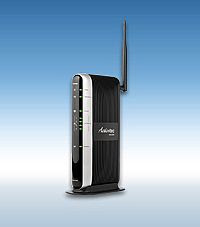
How to install the MI424WRN Broadband Wireless Router
We'll review the easy steps on how to install and setup your Actiontec MI424WRN Broadband Wireless Router.

Instructions
Things You'll Need:
- MI424WRN Broadband Wireless Router
- Power Cord
- One Yellow Ethernet Cable
- One White Ethernet Cable
- Step 1
Get the Broadband Wireless Router from the box.
If you were using a different router, please disconnect the device. Don't forget to remove all of the router components including the power supplies and all cables because they are NOT inter-operable. - Step 2
Plug the smaller end of the black Power Cord into the Black Port on the back of the Router. Then plug the larger end of the Power Cord into a Power Outlet.
- Step 3
Click the On/Off Switch to its ON position.
- Step 4
Make sure the Power Light on the front of the Router is SOLID Green.
- Step 5
Get the Yellow Ethernet Cable and plug one end of the Yellow Cable into any of the four Yellow Ports on the back of the Router.
- Step 6
Make sure that your computer is turned on. Then plug the other end of the Yellow Cable into the Ethernet Port on the computer.
An Ethernet Port looks similar to a regular Phone Jack but is slightly larger. - Step 7
Make sure at least one of the Ethernet lights on the front of the Router is either solid or flashing Green. This may take a few moments.
Note: If the Ethernet Light does NOT turn green, make sure the Yellow Ethernet Cable is properly connected on both ends. - Step 8
Get the White Ethernet Cable and plug one end into the Ethernet Jack on the Cable or DSL Modem and the other end into the White Ethernet Port on the back of the Router.
- Step 9
Make sure that the WAN Ethernet light is either solid or flashing Green.
Note: If the WAN Ethernet Light does NOT turn green, make sure the 2nd Ethernet Cable is properly connected on both ends. - Step 10
Open a Web browser and type http://192/168.0.1 in the address bar. Then press Enter on the keyboard.
- Step 11
When the Login screen appears, enter the default user name (admin) and password (password). Then click OK.
- Step 12
Enter a new User Name and Password and select the appropriate Time Zone. Then click OK.
- Step 13
The "Main Menu" screen appears. Check to make sure that you have a GREEN light on the left-hand side.
- Step 14
Make sure that the Ethernet Status under Broadband Connection shows that it is CONNECTED.
Congratulations! You have successfully installed and configured your Actiontec Broadband Wireless Router.


Friday, 30 October 2009
Samsung and TeliaSonera bringing LTE to vikings in 2010

http://www.engadget.com/2009/10/22/samsung-and-teliasonera-bringing-lte-to-vikings-in-2010?icid=sphere_blogsmith_inpage_engadget
Saturday, 10 October 2009
Internode Launches Mobile Data Service On Back Of Optus 3G

By Nick Broughall
Internode have jumped on the mobile data train by hopping into bed with Optus. Their mobile service, called NodeMobile Data, will be available from tomorrow, and uses the Optus 3G infrastructure.Pricing starts at $14.95 a month for 250MB, or you can get 3GB for $39.95 a month, which all seems to hang on the more expensive side of the mobile data spectrum (Three offers 1GB for $15 a month and Vodafone offers 5GB for $40). Downloads and uploads count towards the data consumption figure as well, so there’ll be no torrenting here, thank you very much.
Internode customers can get a free USB modem by signing up for 24 months, while non-Internodies will have to fork out $199. You can bring your own modem for a setup fee of $25 (for the SIM card).
Gus over at Lifehacker has a full rundown of the extra data charges, but suffice to say that there are more appealing mobile broadband deals on the market.
Telstra Boosts Next G’s Uplink Speed To 5.8Mbps

By Nick Broughall
You’ve got to give it to Telstra: Even though you pay for it dearly, their Next G network keeps advancing leaps and bounds beyond what any of the other networks have to offer. First there was the speed bump to 21Mbps download speeds, and now they’ve bumped up the upload speeds to 5.8Mbps.
Like the 21Mbps figure, the 5.8Mbps is only a theoretical maximum – in the real world you’re more likely to get speeds of 300Kbps to 3Mbps in capital cities, or up to 1Mbps everywhere else. For comparison, Optus’s HSPA network has a theoretical maximum of 2Mbps uplink, with real world speeds in metro areas varying between 150Kbps and 1.5Mbps (or 1.1Mbps in regional areas). Telstra reckon that this speed boost makes uploading stuff about 3 times faster than before.
The uplink speed boost will work with the Telco’s 21Mbps HSPA modem straight away with a firmware upgrade available from Sierra Wireless’ website, while other NextG and BigPond customers will have the update made available in the coming weeks.
[Telstra]
Wednesday, 7 October 2009
HughesNet Satellite Internet Broadband

Hughes Net satellite internet delivers high speed internet service which is up to 50 times faster than dial up connection. There are some choices for the HughesNet satellite internet that will meet your broadband need including Hughesnet Home plan, Pro plan, ProPlus plan, Elite plan, and ElitePlus plan. The Hughesnet Home Plan offers download speeds up to 700Kbps, while the ElitePro is the fastest plan offers download speeds up to 3.0 Mbps. If you need the satelite internet at home, then the Home plan might be the best option for you.
You can go to SatelliteInternetBroadband.com to order the hughes net wireless internet service. In this site, you will get free standard installation for all HughesNet plans and free equipment including modem, satellite antenna, coaxial cable jack, mounting hardware, and ethernet cable. So, if you need broadband internet connection, you can order the HughesNet satellite internet from this site.
.http://www.arfic.com/2009/09/hughesnet-satellite-internet-broadband.html
Wednesday, 16 September 2009
Nokia launches 100Mb/s 4G modem
Author: Gareth Halfacree .
If 3G mobile broadband is just too sluggish for your tastes, and the stop-gap 3.5G isn't boosting things enough, it might be worth having a word with Nokia: the company has just launched the first test versions of its 4G LTE modem.Nokia's Internet Modem RD-3 - sadly not yet pictured - promises a sustained 12Mb/s connection for mobile browsing.
 As reported over on Electronista, the company's Internet Modem RD-3 is the first commercially available version of its Long Term Evolution devices - a modem which is backwards-compatible to 3G HSPA and 2G EDGE devices, but which offers LTE-compatible systems a peak data transfer potential of 100Mb/s.
Peak speeds are fine and well, but it's the sustainable throughput that will get most interested: where 3G technologies offer unsustainable peaks of 14Mb/s downstream, the 4G LTE network should offer a consistent 12Mb/s - which finally brings mobile broadband to a point where it can genuinely compete with fixed-line speeds.
It's not just about the speed, either: improvements to the technology mean that LTE should result in a marked reduction in lag, meaning mobile gaming and high-quality two-way video calling will become far less of a chore.
Thus far the RD-3 is not available as a general purpose device, instead being sold to select carries to test their networks for LTE suitability. However, with the product clearly ready for rollout it can't be long before we starting seeing companies around the globe making use of the technology's global roaming functionality to offer far faster Internet access to their customers.
Sadly, no handset currently on the market supports the technology - although as carries begin testing that is sure to change.
Does the thought of a lag-free rock-solid 12Mb/s mobile broadband connection fill you with joy, or do you think that mobile providers will simply wreck it with ridiculously high charges and low download limits? Share your thoughts over in the forums.
http://www.bit-tech.net/news/bits/2009/09/08/nokia-launches-100mbps-lte-modem/1
Wednesday, 9 September 2009
Regional Broadband Global Area Network (RBGAN)
Regional Broadband Global Area Network (RBGAN) satellite terminals provide 144kbps internet access (shared bandwidth best effort) for most of Europe, Africa, the Middle East, Asia, Ind
ADVISORY: Inmarsat is phasing out RBGAN service after December 31, 2008 to allow more capacity for its newer and more powerful BGAN service. The HNS-9101 RBGAN terminal by Hughes Network Systems is being replaced by the new more powerful HNS-9201 BGAN terminal which offers much higher data rates, streaming IP data, ISDN, and voice service.

Sunday, 6 September 2009
iiNet BoB wireless modem

Upside
In an attempt to simplify home networking and internet telephony, ISP iiNet has partnered with Belkin to launch an Australian developed modem/router/VoIP phone device to be marketed under the name of BoB. (The name is apparently a play on "Broadband in a Box"; but why, given its Aussie genetics, could they not think of an appropriate acronym for BRuCE we ask?)
BoB's got four Ethernet ports and wireless b/g/n capabilities to connect up to 16 wireless devices, so networking whatever you want to in your household should be no problem. It also serves as a base station for standard phone or VoIP calls when teamed-up with either a BoB handset or your existing DECT-compatible handset. It can support up to three separate phone lines and five telephone handsets at once.
If you have an ADSL connection and a normal PSTN phone line, BoB works as a normal phone. If you have a VoIP service, BoB will by default use VoIP to make and receive calls when your broadband connection is active with failover to PSTN if the connection drops out for any reason. And if you're on iiNet's Naked DSL, all local and national calls will route through your internet connection.
iiNet claims that BoB's very easy to set up. Once the power and phone cables are connected, the rest of the set up can be managed remotely by iiNet using your specific broadband account and settings.
It also has two USB ports on-board. One "charge" USB port can charge mobile phones, iPods or any other USB-charge device. The other USB port is designated as "storage/3g" for network sharing of files stored USB hard drives and flash drives. It is planned that this same port will also be able to support 3G (mobile broadband) dongles; however, its 3G functionality is not currently available and will have to be enabled via a future firmware upgrade.
Downside
If you're using another internet service provider, you'll have to switch, as BoB is exclusive to iiNet.
And sorry, a router with the same name as my father is just weird.
Outlook
The pricing structure allows you to buy the unit for AU$369 outright (including a handset) or AU$269 if you sign up for a 24-month contract. You can connect up to five additional BoB phone handsets at AU$69 each.
Depending on how much you're spending on broadband and telephone charges, BoB might be a simple way to get your home network up and running as well as cut the cost of your landline telephone, providing you're willing to sign up with iiNet.
http://www.cnet.com.au/iinet-bob-wireless-modem-339297865.htm
Subscribe to:
Posts (Atom)